School management software that empowers teachers
Manage results, attendance, fees, admissions, and learning in one connected system - free for every school, so teachers can focus on students and leaders can act with clarity.
Built for Nigerian schools
Designed around how schools in Nigeria actually operate, day to day.
Guided onboarding
Practical help setting up your structure, staff, students, and workflows.
School data handled carefully
Clear access controls, encrypted connections, and privacy-focused practices.
Less administration. More attention for every student.
Knowvia connects the work teachers, administrators, students, and parents do every day, without forcing schools into complicated processes.
Results and assessments
Complete results faster and give students useful feedback sooner
Teachers record CA scores, manage assessments, and prepare report cards without rebuilding the same spreadsheets every term. Continuous assessment, examination scores, attendance, affective traits, and psychomotor skills all come together automatically once scores are entered.
Every result is processed, reviewed, and approved before it reaches students and parents, and each student's academic history stays available across sessions and terms - so performance trends are easy to see, not just individual report cards.
School operations
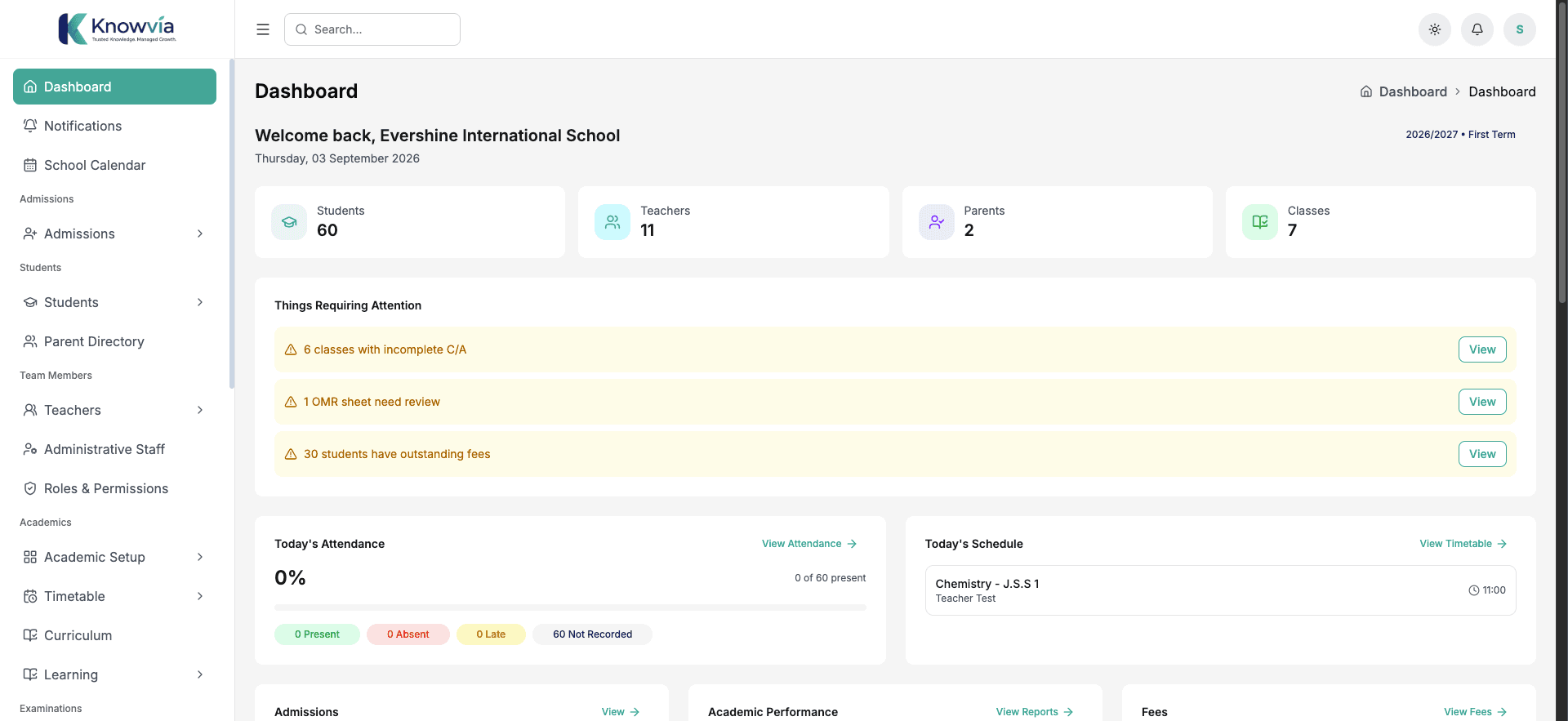
See attendance, fees, and daily activity from one clear dashboard
School leaders get a practical overview of what needs attention without chasing updates across offices and notebooks - admissions, attendance, examinations, fees, and results in one place.
Set up fee structures per term and let parents see what's due and their payment history. Online payment is an optional convenience, not a requirement - schools can still accept payments in person alongside it.
Teacher tools
Reduce repetitive administration so teachers can support students
Keep student records, class activity, results, and communication connected to the work teachers already do. Lesson notes can be created, started, tracked, and finished against the classes and subjects a teacher is assigned to.
Assignments, attendance, and score entry live in the same workspace, so a teacher's day stays focused on what needs doing today rather than switching between disconnected tools.
Learning beyond class
Keep students and parents connected to learning and progress
Share learning materials, assignments, notices, and progress through dedicated student and parent experiences. Students can view their subjects, submit assignments, and check exam timetables and results in one place.
Parents can follow multiple children from a single account - fees, announcements, report cards, and the school calendar included - without waiting on a phone call or note home.
One school, clearly connected
The right view for every person in your school community
School leaders
See what needs attention across your school
Track students, staff, admissions, attendance, results, and fees from one practical overview.
- One view of daily school activity
- Quick access to common tasks
- Clear records for better decisions

A school administrator's experience
What schools say once they switch to Knowvia
“This space is reserved for a real testimonial from a Knowvia school. Replace this placeholder quote once your first featured school has agreed to be quoted here.”
Getting started
A clear path from setup to everyday use
Knowvia gives your school a practical structure to start with, plus support while your team settles into new routines.
- 01
Set up your school
Configure your sessions, terms, classes, subjects, and grading structure.
- 02
Add your team and students
Create staff and student records, then give each person access to the tools they need.
- 03
Prepare your core workflows
Set up results, attendance, fees, assessments, and the learning experience your school needs.
- 04
Start with guided support
Bring your team onto Knowvia with practical onboarding help as your school gets comfortable.
Our mission, not a marketing line
The platform is free. Always.
We built Knowvia to lighten the administrative load on schools and help more Nigerian schools adopt ICT in how they manage their operations - so every tool your school uses is free, for every school, from day one.
A practical place to start
Free, for every school
No hidden tiers. No platform fee for your school.
- No credit card to start
- Guided onboarding support
- Every school tool included, always
Questions from schools
Questions schools ask before getting started
Clear answers about setup, pricing, access, and how Knowvia works in your school.
Yes. Knowvia is built for primary and secondary schools in Nigeria. It helps administrators, teachers, students, and parents manage results, attendance, fees, admissions, and learning in one connected system.
Yes. Parents get a dedicated portal where they can monitor their child's results, attendance, fees, and overall progress in real time, without waiting for a printed report card.
Teachers create and distribute assignments, record CA scores, and manage assessments through one connected workspace, so grading and report card preparation no longer mean rebuilding a spreadsheet every term.
Knowvia provides guided onboarding to help your team configure your school structure, add staff and student records, and become comfortable using the platform.
Knowvia is free. Every feature - results, attendance, fees tracking, admissions, timetables, CBT, OMR, and communication - is available at no cost to your school, because our goal is to lighten the administrative load on schools and help more Nigerian schools adopt ICT in how they manage their operations.
Knowvia uses encrypted connections, password hashing, role-based access controls, and school-scoped data separation to protect school information. Schools control who can access each area of their own data.
See how Knowvia fits your school
We'll walk you through the tools that matter most to your teachers, administrators, students, and parents.